What people are saying about Ultimate Pen
"...Your excellent little program, Ultimate Pen, has helped me for the past 2 years. Its simple, effective and rock-solid performance works seamlessly with any program, allows me to highlight portions of slides and sketch simple diagrams directly on the screen, making my lectures more professional looking and better understood."
- Bruce F. Kinsey; www.bfkinsey.com
more

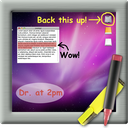
Draw on top of most applications
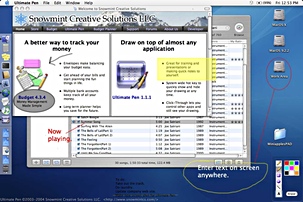
Ultimate Pen is a software only solution which creates a full screen, transparent window, allowing you to draw on top of most applications. Think of Ultimate Pen as an incredibly easy way to doodle on your computer screen.
Ultimate Pen can be used for drawing on just about anything, it is particularly useful when working with presentation software. You may add notes, draw shapes, make comments, or add illustrations directly on the screen. You can use Ultimate Pen with a mouse directly or even better, a drawing tablet.
Major Features
- Available in 9 Languages: Includes localizations for US English, Spanish, German, Italian, Polish, French, British English, Traditional Chinese, and Simplified Chinese.
- Clipboard support: Copy and paste graphics to/from the clipboard.
- System Wide Hot Key: Be ready to draw, or hide your drawing, with a single keystroke.
- Full Color: Draw with ANY color. Make quick color changes using keyboard shortcuts.
- Marquee Selection: Copy or save a portion of any display, or simply slide your drawing around onscreen
- Multiple Display Support: Enable/disable drawing on every display connected to your computer.
- Click-Through: Your drawing can float untouchable above the rest of your applications.
- Languages
- British English
- Spanish
- German
- French
- Italian
- Polish
- Chinese
- English

Reviews
"I purchased Ultimate Pen and am loving it. I use Safari for all my college lecture presentations. Safari with SAFT gives me full screen, and (with SAFT set to keep it full screen when switching to other apps) Ultimate Pen makes it the ultimate presentation format."
David A. Johnson
"I find this utility very useful and well done. After playing around with it a bit I think I'll buy it to give presentations."
Xavier Noria
Trial download limitations
Ultimate Pen can be downloaded and tried for 40 launches or use on 20 different days, whichever comes first. The demo period expires at that time. Once Ultimate Pen is purchased you can use it as much as you like, the Welcome window no longer displays, the tools palette Register button activates Click-Through instead, and the onscreen watermark no longer appears.