
| Budget Planner Help | Index |
|
Plan for the Future |
You have set up a budget based on the information you now have about your expenses. You have been depositing your income, making deposits, and paying expenses. All of these are the normal day to day things that are required for managing your finances. But how do you deal with those one time big ticket items that are a big part of staying within your budget? How do you determine if you will have enough to handle those kinds of items? The planner is designed as a helper tool in making those decisions.
The planner provides a graphical way of dealing with upcoming financial events in a "what if?" manner. It provides a means of defining an event as something that is going to happen in the future and that lasts for a period of time. These events can be either positive or negative. A positive event could be an expected raise in pay. If you think you will have a debt paid off a year from now then the event would be the amount of the payment you will no longer be making. A negative event might be needing money for a new car a year from now, or those big college expenses that are coming later.
You can use the planner in a number of ways. The simplest is in the form of a savings calculator. Set a starting amount, the amount added monthly, the interest rate, and the amount of time then the planner will graphically project the results.
You can use it to predict the inflated value of an item some number of years from now. How to plan for that new car you want next year or for college expenses. You can also use it to plan for retirement. See the examples for details on how to accomplish the above objectives.
|
Warning: Budget Planner does NOT provide exact amounts. It is not an established accounting practice. Rather it's use is in determining relative values and rough estimates. It is impossible to predict the future! The ability to play "what if" is the strong point about the planner. For example, it's impossible to predict the value of a future purchase. A new car you're looking at today might cost $20,000, but what will it cost 2 years from now? With the planner you can estimate what you think inflation will be over the next 2 years, but you will most likely be somewhat off. Likewise the actual cost of the car will probably have changed regardless of what the real inflation was over those two years. Therefore, you should use the planner only as a general guide. |
When you start the planner you will be presented with a new untitled plan. You can use the File > Open menu command to open any previously saved plans.
| Note: You will not be able to save a plan until you have registered. See the Registration topic for details on how to register. |
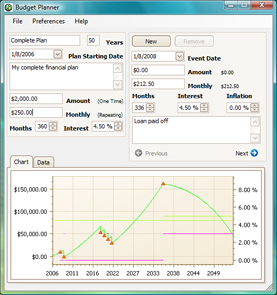
The planner has three sections. The top left section has the basic plan information. They are: the plan name, length of the plan in years, starting date, a description, the starting amount (Amount), the amount added (or subtracted if negative) monthly (Monthly), the time span for this monthly addition or subtraction (Months), and the interest rate (Interest). You may change any of this information at any time.
The box on the right contains the event information. When you first start a plan the information will be blank. See the Planner Events topic for more information about creating and editing events.
The bottom section shows the plan in graphic form. See the Planner Graph topic for a description of the information shown on the graph and how to work with the graph.
Use the Budget Planner > Preferences... menu command to change how the graph looks, and to set other options. See the Preferences topic for more information.