|
Example 4 |
Planning for retirement
How To: Plan for retirement (part 1)
- Use the plan from example 3. If you saved that plan in a file, use the File > Open Recent menu command to open the previous plan. If you did not save the plan from the previous example, you should do that example first then continue with this example.
- Change the Name of the plan to "Complete Plan".
- Change the Description of the plan to "My complete financial plan."
|
Let's make some assumptions for this example:
- You are 35 years old.
- You want to retire when you are 65.
- You will need to withdraw $300 per month from savings to supplement your social security income.
How To: Plan for retirement (part 2)
- Change the length of the plan to be 50 years. You may have to make the window larger for this example.
- Enter 360 in the plan Months field. This covers the remaining 30 years you will continue to save before retiring.
- Modify the loan event so that you will continue to save the $212.50 until retirement.
- Select the loan event by clicking that event on the graph.
- Change the number of months for that event to 336. You have 28 years from when this event starts until retirement.
- Create a new event for your retirement spending by clicking the New button.
- Set the retirement event date to 30 years from now.
- Enter a Description of "Supplemental Income".
- Enter a negative $300 in the Monthly field. This money is being withdrawn from savings to help cover your expenses after retirement.
- Enter 240 for the event Months; retirement will last 20 years.
- Enter 5% interest for this event. This is a rough estimate since you're planning 30 years in the future.
- Enter 3% inflation for this event. This is a rough estimate since you're planning 30 years in the future.
|
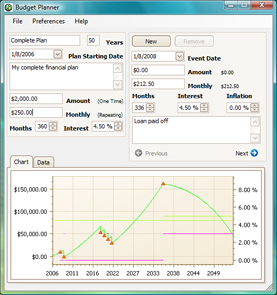
When done, your plan should look similar to the window below. If you have registered Budget Planner, you can save the plan in a file for future use.
Click at the right side of the graph line, and look at the description of the plan amount. It seems like you will still have about $57,000 after 20 years of retirement. However, remember this is all based on your guesses regarding the interest your money will be earning and how much the inflation rate changes over time.
To see the effect inflation has on your retirement plans, let's make a small change. Select the retirement event, and change it's inflation rate from 3% to 4%. This makes a big difference; in this scenario you run out of money after 15 years.